
Sometimes the scale of the previous location plan can be different from the values that were entered into SignAgent (even if they were 0), which can cause issues like the example below.

There are two possible scenarios that would lead to this issue.
- This is the first time a scale is being assigned to the location
- The previous or current scale is incorrect
1. Delete floor plans
1a. If This Is the First Time Scale Is Being Assigned
Delete all locations in the history except the first.
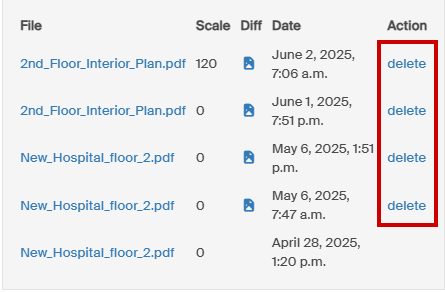
1a. If This Is the First Time Scale Is Being Assigned
This will bring the floor plan back to its original state, so we can determine the true scale of the previous floor plan.
2. Download the previous floor plan and find the scale
Even if a scale is written on the document it may not be accurate. Use a PDF measuring tool (Acrobat or Illustrator are recommended) to calculate the scale of the document. Some measurement references are better than others. Look for a:
1. Scale bar
2. Dimension line
3. Object with known dimensions (stairway or door width) but larger is better for accuracy
EXAMPLE
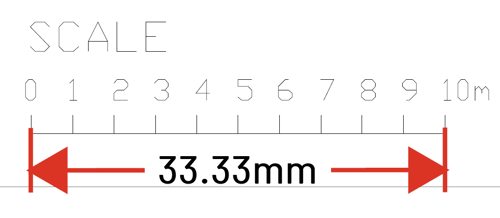
Measuring this scale line shows that 10m is 33mm on the plan.
10,000mm / 33mm = 300 which is our scale factor.
The document has a 1:300 scale.
3. Enter the correct scale into SignAgent for the existing plan
Once the true scale has been determined, enter the value into the "scale" section and choose "Save & Close".

4. Upload the new floor plan
Now that the proper scale is set for the previous plan you can upload the new one. Enter the proper scale and choose "Save & Close".
- In rare circumstances a legacy issue may mean sign positions still don’t reconcile. In this case, contact the SignAgent team via email to assist: support@signagent.com